What is checkout?
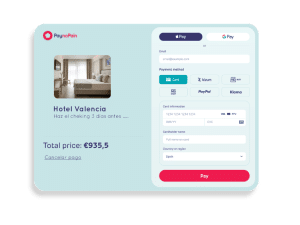
Checkout in ecommerce is the final stage of the purchase process, when the customer confirms the cart with the selected products or services, enters their details, and completes the payment. Just as there are product pages and a cart page, ecommerce websites have a dedicated page for this process. Checkout does not refer only to the actual payment, but includes the entire customer journey from product selection to purchase confirmation.
How does checkout work?
In ecommerce, checkout processes include multiple steps. Each step involves entering data such as shipping information, payment option, payment method, etc. At this stage of the purchase process, the consumer already intends to buy, so it is essential to avoid discouraging them from completing the payment. Understanding how the most effective checkouts work and following best practices is key to optimizing conversion.
What elements should a checkout include?
It is essential that on the checkout page, the customer can clearly identify the details of their purchase:
-
A summary of the products and/or services to be purchased, including quantity and the option to add or remove units.
-
Personal details, shipping address, and delivery options.
-
The option to enter a discount or promotional code.
-
A section displaying the available payment methods.
Why do customers abandon the purchase process?
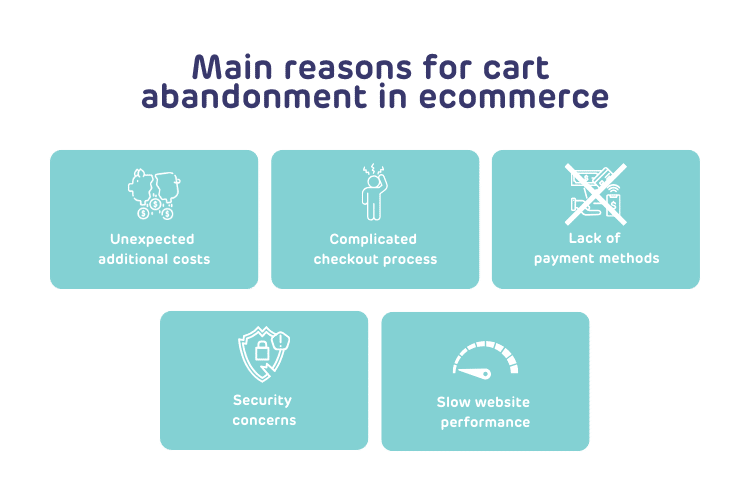
Cart abandonment is a common issue in online commerce. Through checkout optimization, barriers that prevent customers from completing their purchase can be reduced. Strategies such as allowing easy error correction, offering multiple payment options, and providing clear cost information are effective in reducing cart abandonment. The main mistakes to avoid during checkout are as follows:
Best practices for an effective checkout
How to improve the payment experience?
A well-designed checkout is essential to ensure a good payment experience. Merchants with a 4-step checkout achieve higher conversion compared to those with 1 to 3 steps. Users prefer a logical and sequential process, so the design must be fast, simple, and clear to avoid confusion. Some best practices for an effective checkout include:
-
Simplified payment form
A good checkout should have a simple and intuitive payment form that only requests essential information to complete the purchase. Avoiding unnecessary fields improves the customer experience and streamlines the process.
-
Detailed product information
Providing a clear product summary at checkout is crucial, including images, descriptions, and details that allow the customer to confirm their purchase before completion. This builds trust and ensures the order is correct.
-
Secure payment gateway
Security is fundamental in the payment process. A well-designed checkout must integrate a secure payment gateway with protection measures such as PCI-DSS compliance, 3D Secure authentication, and data tokenization to protect customer information.
-
Optimized user experience
The purchase process should be easy and efficient, with few steps and clear information presentation. Ease of navigation and attention to detail can make the difference between a completed purchase and an abandoned one.
-
Convey security and trust
It is crucial to ensure customers feel safe when entering sensitive data. A well-designed checkout incorporates robust security measures, conveying trust and protecting personal information.
-
Mobile adaptability
Given the growing number of mobile purchases, checkout must be fully functional on mobile devices. Ensuring it adapts correctly to different screen sizes and operating systems improves accessibility and user experience. Implementing these best practices helps optimize the payment experience and increase conversion rates.
Resources to optimize your checkout
If you want more information on how to optimize your business checkout to reduce cart abandonment and increase sales, here are some related posts that may help:


